
We've been building AI features in Rails for years at Tern, including our chat agent with 100+ tools, itinerary importing, commission reconciliation, passport parsing, email classification, and more. After several iterations starting with a homegrown solution, all of it now runs on RubyLLM, a Ruby AI framework for building features with large language models.
We chose RubyLLM because it hit the right abstraction level: provider-neutral primitives, a clean API, and opinions on persistence, without trying to overreach its bounds. In short, it adheres to many of the Rails philosophies.
By mid-2026 we'd started hitting edges. Our approval flows relied on a halt mechanism in a way that it wasn't designed for. Prompt caching required provider-specific options. Routing errors the way we wanted meant patching classes that weren't intended to be public. Batch API calls were not supported by the framework. And background resumability required careful logic to repair interrupted conversations.
These were all reliable workarounds, but were things that could be provided in the framework. We connected with Carmine Paolino, the gem's creator, for an architecture review. We learned Carmine was already building RubyLLM 2.0, and several of the anti-patterns in our code were already solved, with others becoming first-class APIs. This post is about those patterns, and the upgrade.
Migrating hacks to first-class APIs
Approval workflows
Our chat agent has many tools, and about a third of them mutate data such as creating trips, updating activities, or sending emails. The advisor needs to be in the loop to confirm before any of these execute.
In v1, we built this on top of halt. The tool would call it to stop the conversation loop, we'd show the advisor a confirmation card, and when they accepted, we'd re-queue the background job to continue execution with the final tool result for the LLM to see. This way, the advisor is kept in the loop to avoid destructive or incorrect actions, allowing them to steer the outcome with their expertise.
The problem was that halt wasn't designed for this. It was meant to stop the conversation after a tool result, not to suspend a tool before execution while waiting for human input.
It was a way for us to achieve our use case. We had a Tools::Confirmable concern that overrode Tool#execute, and a matching Prepare service per mutation-type. The service pre-validated parameters before showing the action card to catch hallucinations and enforce complex business rules that can’t be represented in prompts or a schema.
Now, v2 provides a durable approval primitive. A tool declares requires_approval, and the loop pauses automatically:
class CreateTrip < RubyLLM::Tool
	# v2: the tool declares it needs approval
  requires_approval

  description "Create a new trip for the advisor"
  param :name, desc: "Trip name"
  param :destination, desc: "Primary destination"

  def execute(name:, destination:)
    # This only runs after approval
    Trip.create!(name:, destination:, user: context.user)
  end
end
Caching
Prompt caching is one of the levers available to us for cost optimization. The system prompt plus tool definitions measure in the thousands of tokens. The key insight is that the vast majority of the tools and system prompt are static for everyone, with only a few advisor-specific details at the end. Without caching, we'd pay the full cost on all of that shared static system prompt.
In v1, we implemented a two-tier caching strategy using provider-specific escape hatches.
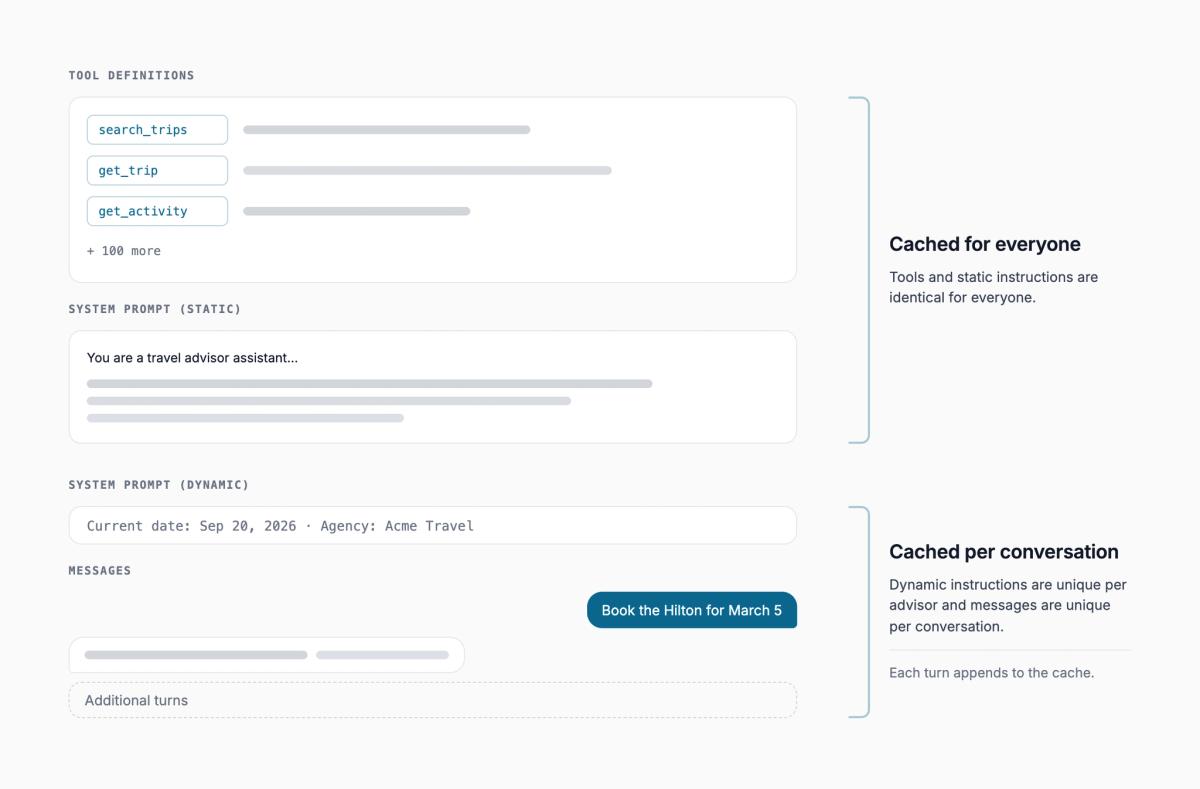
This told the provider to automatically cache the conversation. Combined with splitting our system prompt into static and dynamic blocks, we get multiples more usage for the same cost.
In v1, this required custom code to implement multiple agent instruction blocks with different caching strategies and provider-specific options.
In v2, there is now an API for this exact use case, removing the need for custom code and provider-specific options.
# v2: provider-neutral caching with explicit boundaries
class AI::Chats::Agent < ApplicationAgent
  caching  # automatic conversation caching across providers

  instructions "You are a travel advisor assistant...",
    cache_until_here: true  # pin the static prompt as a cache boundary

  instructions -> { dynamic_context },
    append: true,
    persist: false  # dynamic per-user context, not cached
end
The caching directive handles automatic caching. The cache_until_here: true on the static instructions creates an explicit boundary. Both work together: the static prompt is always cached, and the growing conversation history is auto-cached.
We caught an edge case during the release candidates. It treated these two caching modes as mutually exclusive, so our setup silently lost conversation caching. We shared it, and a fix was shipped within hours.
Error handling and monitoring
In v1, we routed LLM errors differently depending on their type. Expected errors outside our control (random timeouts, overloaded provider) should go to aggregate metrics for alerting, not individual error tracking. There's no action for an engineer to take on intermittent errors that are retried successfully. Unexpected errors (bad requests) should go to error tracking because they're usually our fault.
We built this by prepending a module onto RubyLLM::Chat that overrode the core complete method with this error mapping. It worked, but we were reaching into the gem's internals.
Now, v2 provides a declarative API for this:
# v2: declarative error handling
class ApplicationAgent < RubyLLM::Agent
  rescue_from RubyLLM::RateLimitError do |error|
    Metrics.increment("llm.rate_limit", 1)
  end

  rescue_from RubyLLM::BadRequestError do |error|
    Errors.notify(error)
    raise
  end
end
The tool calling loop
As mentioned earlier, we relied on the halt mechanism as the only way to interrupt and insert ourselves into the tool calling loop, where some calls may require approval before execution.
There are many other reasons you may want to interrupt and insert yourself into the loop, such as allowing a new user message to be inserted, tracking and enforcing usage limits, or temporarily interrupting a long-running agent during a deployment window.
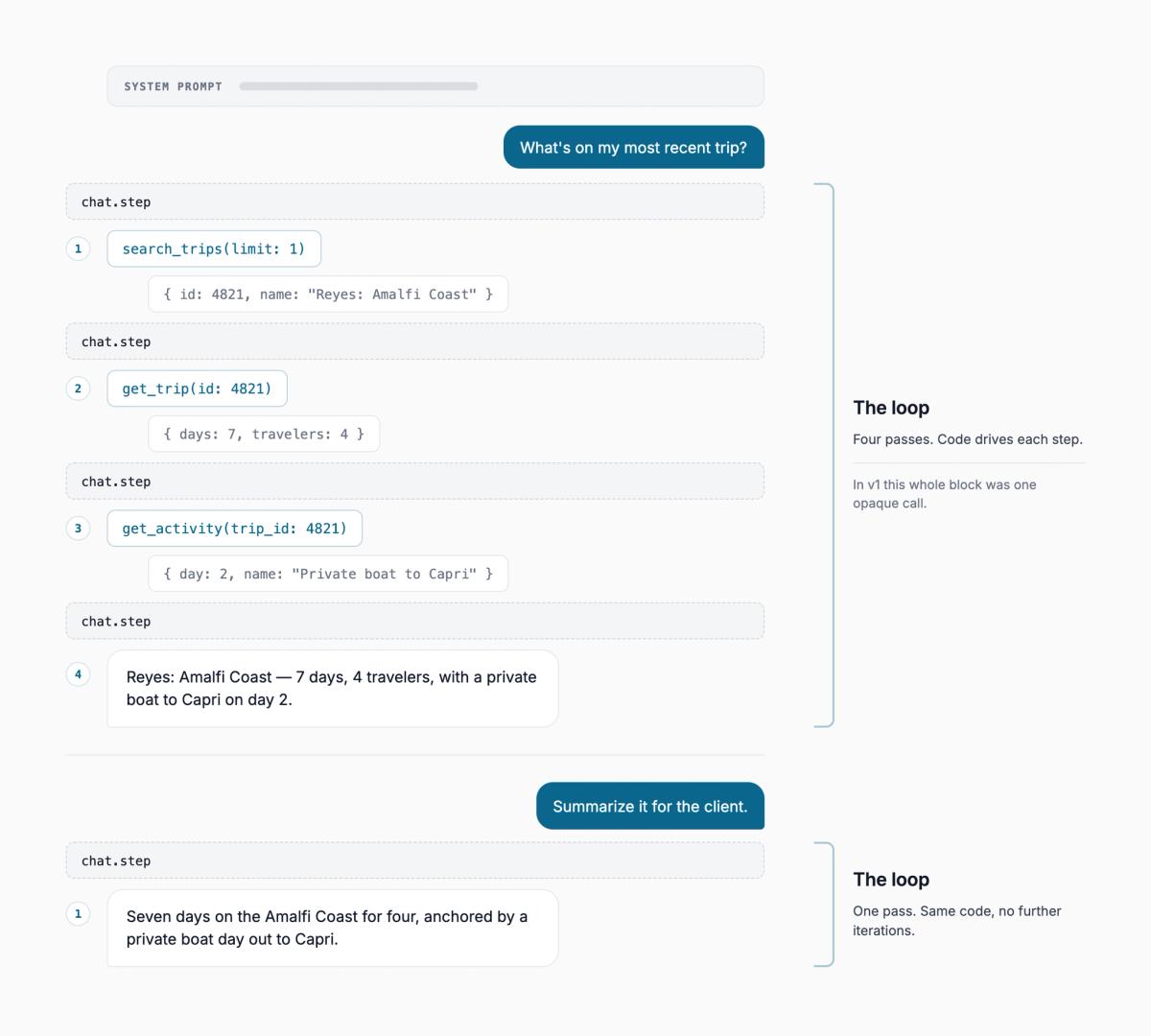
In v1, complete was a black box: once you called it, the gem ran the entire tool-calling loop internally. If the process got killed mid-loop during a deploy, you were in a bad state. We had built recovery logic to detect interrupted completions, repair dangling tool calls, and re-queue the job.
The v2 loop now gives full control:
# v2: step-by-step
loop do
  chat.step

  # RubyLLM
  break if chat.complete?
  break if chat.awaiting_approval?

  # Our own checks between steps
  break if over_usage_limit?
  break if shutting_down?
end
Each step does one thing: either sends the conversation to the model and gets a response, or executes pending tool calls. Between steps, we can now check for approvals, enforce spend limits, or gracefully shut down. This effectively inverts the control of the loop.
The migration
RubyLLM 2.0 restructures the API and how AI data is stored. Tool calls, model records, usage tracking, and batches move into gem-owned tables (ruby_llm_tool_calls, ruby_llm_models, ruby_llm_usages, ruby_llm_batches). Messages get new content columns and new foreign keys. The old tables stay for rollback, but the app code needs the new schema to function.
This creates a chicken-and-egg problem: you can't run two gem versions side-by-side, and the data model isn't backwards compatible.
The original plan was to run all migrations in a single deploy with the gem upgrade in hopes the easiest solution would be the simplest solution.
We tested this locally against a development database and a migration benchmark with several thousand records and proved it worked in theory. Then, we ran it against a production snapshot for more realistic numbers. In production, we have 120,000+ chats, 2.5+ million messages, including 1.4+ million tool calls in the past few months.
After the dry run took 6+ hours on a snapshot, we needed to break the migration into steps.
- Prepare: several pull requests deployed sequentially while v1 served live traffic. They installed shadow tables, added write forwards, a compatibility layer, and Tern-specific reference columns.
- Backfill: batch jobs copied millions of rows of production data into the new schema for tools, usage entries, message content, and references while v1 kept running.
- Cutover: the only part that required pausing AI features. Several migrations to finalize and validate the data model and gem API cut over.
- Cleanup: removing the compatibility layer, removing legacy columns, and dropping legacy tables.
This migration pattern was upstreamed and now ships as part of the gem.
What's next
The upgrade was the hard part. Now we can build on it, and what it unlocks is better for advisors and simpler for us. The step-by-step loop opens up features we couldn't build before, like chat cancellation and graceful handling of deploys mid-conversation. With first-class support across model providers, we can more easily experiment with models to improve the AI chat experience without needing to rewrite provider-specific logic. And with the gem owning more of the lifecycle (batches, usage tracking, error handling), there's less Tern-specific code we need to maintain.